
What you need to know about keeping a SARS Logbook
If you are a South African taxpayer who receives a travel allowance from your employer and uses your private motor vehicle for business travel, you may claim a deduction on your annual income tax return. The South African Revenue Service (SARS) requires you to keep an accurate SARS logbook of this business travel to substantiate your claim.
What is a logbook in South Africa?
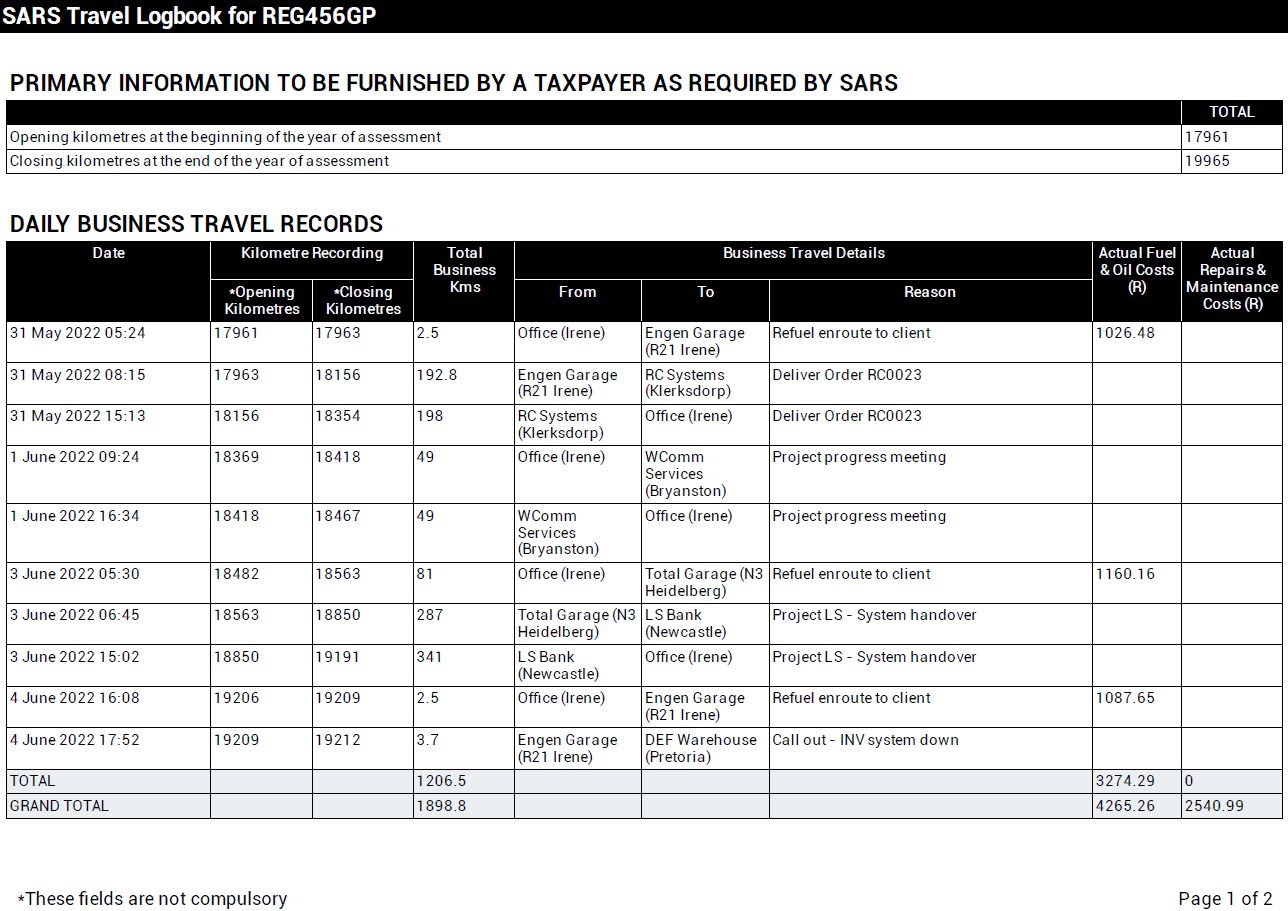
In South Africa, the term “logbook” generally refers to the SARS travel logbook used to record business‑related vehicle travel. The SARS logbook must include the details of each business trip and is required to substantiate a taxpayer’s claim against a travel allowance.
Can I claim travel allowance without a logbook?
No, you will not be able to claim the tax deduction for travel. You will be liable for the tax shortfall if you do not maintain a vehicle logbook in the required SARS Logbook format.
What information must be recorded in your SARS logbook?
You are required to record your vehicle’s odometer reading on 1 March each year and again on the last day of February the following year. Record your business kilometers daily, while ensuring that your logbook contains the following minimum information relating to your business trips:
- Date of travel
- Kilometres travelled
- Business travel details such as From, To and Reason
Where you used more than one vehicle during the tax year, a separate logbook must be kept for each vehicle that was used.
Now that you know what is required, where do you get a copy of the SARS Travel Logbook?
Where can I download the official 2026 SARS Logbook?
The SARS Logbook for 2026 can be downloaded here.
Trip Logbook can help you maintain your SARS Logbook
The Trip Logbook App can record your business and private kilometers automatically. Using the App, you can produce your vehicle logbook report in the required SARS Logbook format. You can also export the logbook to CSV format. The CSV file can be opened in Microsoft Excel, Google Sheets or Apple Numbers.
Maintain your SARS Logbook with these Trip Logbook App features
 Automatically track your vehicle mileage using your phone.
Capture your fuel, oil, repairs and maintenance costs.
Add, edit or delete trips at any time.
Review your logged trips and confirm trip details.
Quickly find all unconfirmed trips using the rich filter feature.
Instantly view the Business vs Private KM ratio using Trip Summary.
Export your trips to CSV and open in your favourite spreadsheet app for deeper analysis and custom formatting.
Export your trips directly to the required SARS Logbook PDF format.
Trip Logging will not be interrupted by network connection failures.
Backup your logged trip data whenever and as often as you like, using the backup and CSV export features.
Automatically track your vehicle mileage using your phone.
Capture your fuel, oil, repairs and maintenance costs.
Add, edit or delete trips at any time.
Review your logged trips and confirm trip details.
Quickly find all unconfirmed trips using the rich filter feature.
Instantly view the Business vs Private KM ratio using Trip Summary.
Export your trips to CSV and open in your favourite spreadsheet app for deeper analysis and custom formatting.
Export your trips directly to the required SARS Logbook PDF format.
Trip Logging will not be interrupted by network connection failures.
Backup your logged trip data whenever and as often as you like, using the backup and CSV export features.


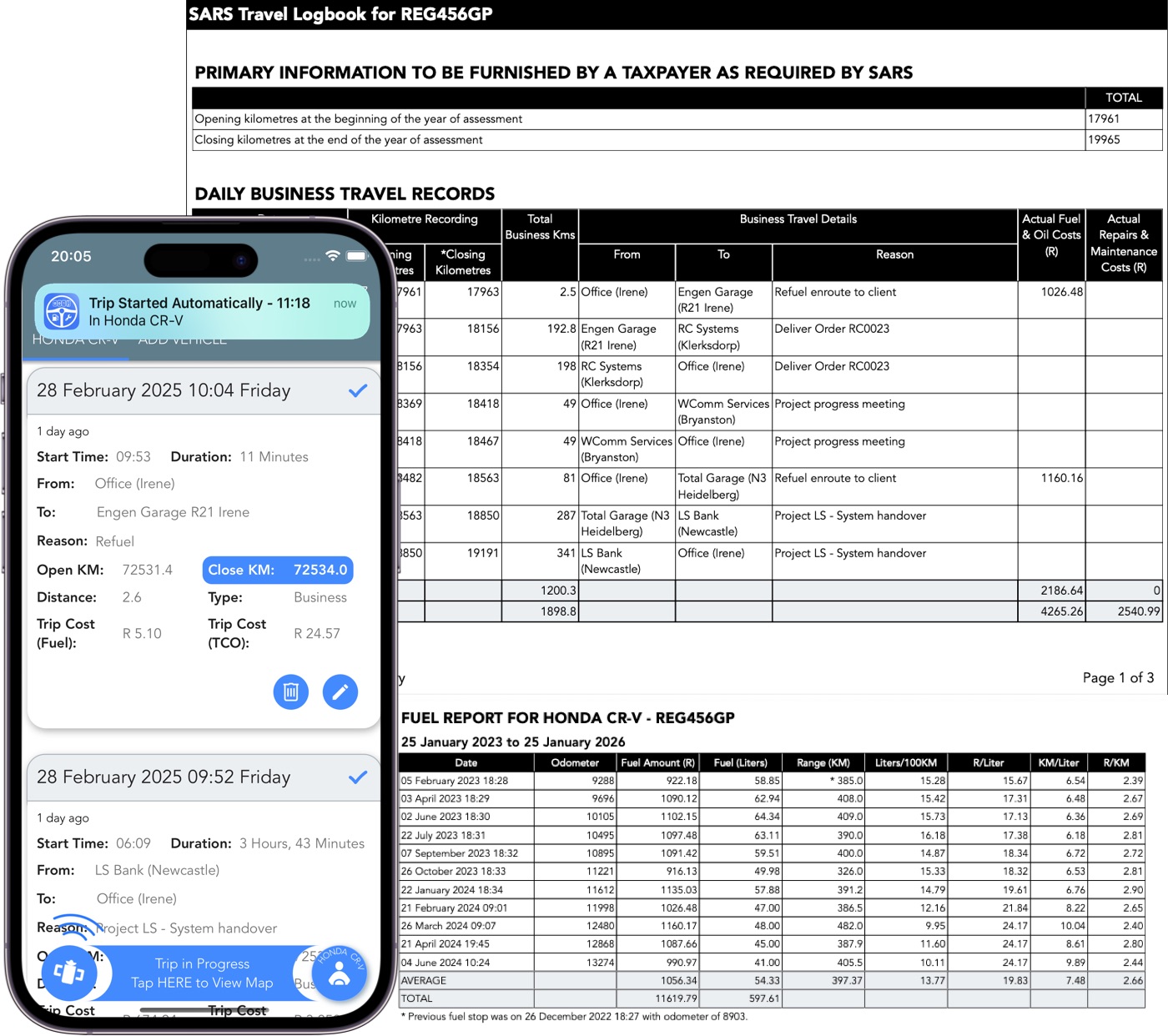
Example of a completed SARS Logbook exported from the Trip Logbook App
This is an example of a completed SARS Logbook exported from the Trip Logbook App.
Important Disclaimer:
The information on this page is provided for general educational purposes only and should not be regarded as tax advice. SARS rules, rates, and enforcement practices may change over time and can differ based on individual circumstances. Always consult official SARS publications or a qualified tax professional to confirm current requirements. Avoid relying solely on summaries or third‑party interpretations.